Why VHS Effect Works Here
Built like a real tape
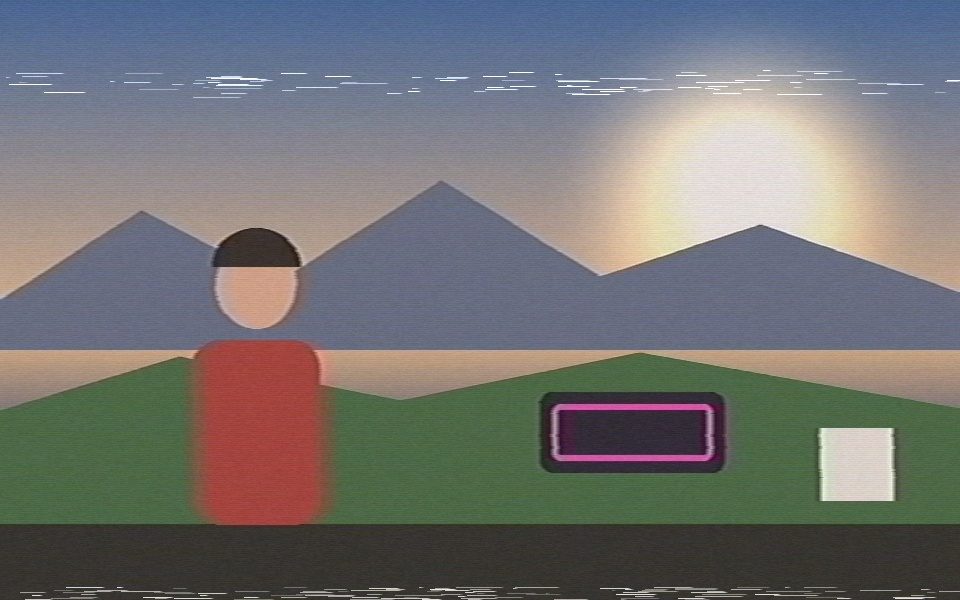
VHS stored brightness at about 3 MHz and color at only about 0.5 MHz. The effect does the same: the picture is split into brightness and color, and color gets several times blurrier and lands slightly late, so it bleeds to the right of the shapes it belongs to.
Tracking, jitter and head-switching
A mistracking band of white noise streaks drifts in, rolls down the frame and fades out again. Every line wobbles slightly sideways, and the bottom few lines tear to one side, like the head-switching band on real tape.
Soft picture, sharpened edges
Detail is softened to tape resolution, then sharpened the way a VCR does on playback, which leaves the bright halo along edges that makes footage read as VHS. Tape noise streaks sideways, blacks are lifted and color is washed out, with the occasional oxide dropout.
On video or webcam
Load an MP4, MOV or WebM for a VHS effect on existing footage, or use your webcam as a live VHS camera filter.
Prefer the camcorder tracking look?
The Retro VHS preset keeps the older look: white dashed camcorder-style tracking outlines over CRT scanlines.
Export the VHS video
Record the result to MP4 or WebM, or animate it with keyframes so the tape look only kicks in for one section.
How to add a VHS effect to a video
- Open the VHS effect Click Launch the VHS Effect — the app opens with the VHS Tape look already applied.
- Add your footage Load an MP4, MOV or WebM, or switch to your webcam for a live VHS camera filter. Nothing is uploaded.
- Dial in the tape Swap the Cinematic LUT (Found Footage or Polaroid Fade fade it further), or add Step Print for a camcorder stutter.
- Export the VHS video Press Record to save an MP4 or WebM with the VHS effect burned in, ready for TikTok, Reels or YouTube.
A VHS effect built from the tape, not a filter overlay
Most VHS filter apps lay scanlines and a REC timestamp over your video. This VHS effect works on the signal instead: colour is recorded at a fraction of the detail and bleeds to the right, playback sharpening puts a halo on edges, tape noise streaks sideways, and a mistracking band rolls through now and then. For the full 80s camcorder look, switch to Squash mode and set Output Aspect to 4:3 — the VHS effect still applies on top.
Every tape control, and what it actually does
The VHS effect is built from the tape's own failure modes rather than drawn on top. Each slider maps to one of them, so "worse" can mean blurrier colour, drifting hue, a rolling band or a tired transport — independently.
- Tape type — Rental SP, Home EP, '90s camcorder, copy-of-a-copy, mistracked and paused each set every slider below as a starting point — then leave them yours to change.
- Tape wear — Softer detail, a stronger edge halo, lifted blacks and a faint echo of every edge. This is the SP-vs-EP difference.
- Colour bleed — How far colour smears past edges and lands late, to the right — the chroma band a VHS deck records at a fraction of the luma detail.
- Colour phase — Chroma phase error: hue banding and drifting skin tones, not just blurred colour. The artifact that reads as tape rather than as a blur filter.
- Highlight bloom — An overloaded playback head streaks bright glints, windows and white titles a few pixels to the right.
- Wow & flutter — Tape-speed instability: the picture stretches and squashes horizontally, a little differently on every line, the way a worn transport wanders.
- Tracking error — The noise band that rolls through, the bent top lines, and how torn the bottom edge is.
- Tape noise — Sideways-smeared grain, colour noise and white oxide dropouts. Mistracking noise is horizontal streaks, not per-pixel static.
- Jitter — Wobbling line starts, the picture hopping vertically, and brightness breathing from the deck's own AGC.
- Interlacing — Combing (moving edges tear into lines), field blend (the soft double image of a de-interlacing deck) or bob (one field at a time, fine flicker).
The camcorder OSD, fully customisable
The on-screen display is drawn before the tape pass, so it inherits the same bleed, halo, grain and jitter as the picture — a crisp overlay on top is the fastest way to make a fake VHS look fake.
- REC lamp — Blinking red dot plus REC, the way a camcorder warns you it is running.
- Battery gauge — Set it full, half, low, flashing — or let it drain over the clip, the thing camcorders are famous for.
- Tape speed — SP or EP, following the tape type (a Home EP recording stamps EP).
- Counter — Clock (0:00:00), broadcast timecode (00:00:00:00) or a tape counter (0:00).
- Date & time — Five formats — JUL. 14 1996, 14 JUL 1996, 1996-07-14, 7/14/96, SUN JUL 14 1996 — or type your own date. Seconds can be switched off.
- Location — A burn-in place stamp (LISBON, PORTUGAL) that either shares the date's line or sits in any corner on its own.
- Custom text — Any line you want, in capitals or not, in any corner: HOLIDAY '96.
- Character generator — Mono (typical camcorder), condensed caps (Hi8 / VHS-C) or a dot-matrix face for early digital overlays.
- Look controls — Text size, margin from the frame edge, glyph flicker (per-character wobble), opacity, and a backing box behind the text.
- Colours — White, amber, green or cyan — the four anodised viewfinder palettes.
VHS is a mode now — and a master Amount
Press V (or pick VHS Tape on the start screen) and the app runs the whole picture through the tape pipeline with no detection at all, with the tape controls in its own Tracking section and one-tap tape pills. Prefer to keep tracking on? Pick VHS from Style › Post FX in any mode and use Post FX Amount to dial the whole effect back — Noir, CRT, Thermal and the rest gain the same master strength, and it can be keyframed.
Three recipes worth copying
- 1996 family camcorder. Tape: '90s camcorder. On-screen text: Camcorder. Location: HOME MOVIES, date on the same line, battery draining, SP. Wow & flutter around 30%, phase around 25%. Loop it and it is a birthday tape.
- Found footage. Tape: Mistracked. Colour phase 80%, tracking 95%, noise 80%. On-screen text: Camcorder with a timecode counter and a low, flashing battery. Add the Creeping Shadows LUT.
- Wedding-video dub. Tape: Copy of a copy. Colour phase 65%, bloom 45%, saturation down. Date bottom-right in amber, seconds off, custom text with the couple's names.
Frequently Asked Questions
How do I add a VHS effect to a video?
Click Launch the VHS Effect, then load your video (MP4, MOV or WebM). The VHS look renders over it immediately; press Record to save it as a new MP4 or WebM.
What makes footage look like VHS?
Mostly how the tape stores the signal: color at a much lower resolution than brightness, so it bleeds sideways; playback sharpening that puts halos on edges; and tape noise that smears along the line. Then the mechanical faults: tracking noise, line jitter and the head-switching tear at the bottom of the frame. This effect recreates each of those.
Can I use it as a live VHS webcam filter?
Yes. Choose Camera as the source and the VHS effect runs live on your webcam feed.
Can I make it look more faded or more colorful?
Change the Cinematic LUT or its intensity: Found Footage and Polaroid Fade push it further, and None gives you the plain tape look. Saturation and Lift/Gamma/Gain in Color Adjustments fine-tune it.
Is there a watermark?
No. The VHS effect is free with no watermark and no signup, and your video is processed in your browser, never uploaded.
Is there a VHS effect app for iPhone or Android?
You don't need one: the VHS effect runs in Safari or Chrome on your phone, on a clip from your camera roll or live on the front or back camera, and exports straight to your photos app.
How do I get the 4:3 VHS camcorder look?
Open Squash mode, set Output Aspect to 4:3 with Reframe on Fit, then set Post-Processing FX to VHS. The frame becomes 4:3 like a camcorder tape and the VHS effect is applied to it.
What is the difference between the VHS effect and the CRT effect?
The CRT effect imitates the screen — scanlines and phosphor glow. The VHS effect imitates the tape — colour bleed, tracking noise, head-switching tear and worn colour. You can stack either one with a Cinematic LUT.
Does the VHS effect add a watermark?
No. The export is your video with the VHS effect and nothing else — no watermark, no logo, no signup.