

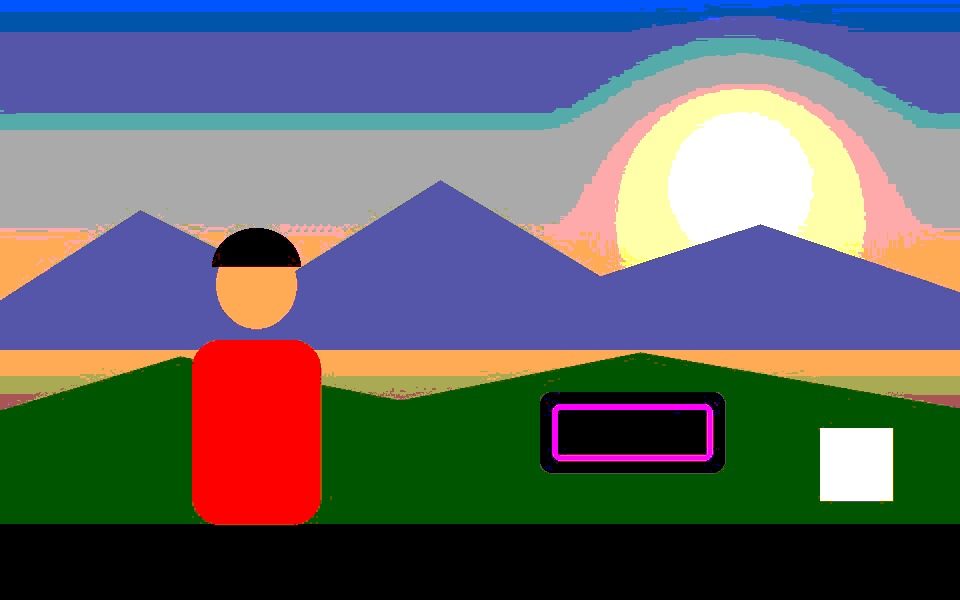
Why Posterize Effect Works Here
Four levels per channel
Red, green and blue each snap to one of four values, so smooth gradients break into bold, flat bands of color.
Saturation pushed first
A 1.6× saturation and slight contrast boost run before the banding, so the result pops instead of turning muddy.
No ink outlines
Unlike the Comic Book effect, posterize has no black edge pass — pure flat color, closer to a screen print than a comic panel.
Move the bands with Gamma
Color Adjustments run before the filter, so nudging Gamma or Gain shifts where the band boundaries fall.
Combine with tracking
Tracked outlines are drawn first and posterized along with the frame.
Export video or stills
Record MP4 or WebM, or save PNG screenshots of your favorite frames.
Frequently Asked Questions
What does posterize do to a video?
It reduces the number of distinct color values, so smooth gradients become flat bands — the classic poster-print look.
How is it different from the Comic Book effect?
Comic Book adds black ink outlines and uses five levels without the saturation push; Posterize uses four bolder, more saturated levels and no outlines.
Can I use it on my webcam?
Yes — choose Camera and the effect runs live.
Can I record the posterized video?
Yes — Record exports the result as MP4 or WebM.
Is it free?
Yes — free, no signup, and nothing is uploaded.



