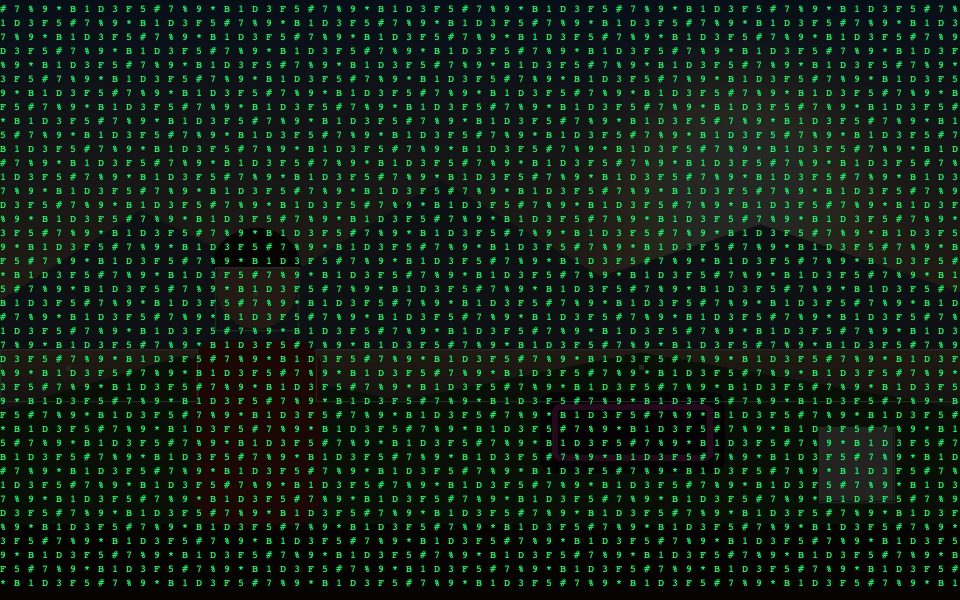
Why Matrix Code Rain Webcam Effect Works Here
Real post-processing, not a sticker
Matrix Rain re-renders the actual video feed as falling ASCII characters, not a static overlay on top.
Combine with any tracking mode
Layer it under Blob, Motion, Face, Object, Pose, or Hand tracking for a Matrix-style scene with a tracked subject inside it.
Works live or on export
Runs in real time on webcam or video, and carries through to recorded exports too.
One dropdown, no setup
Post-FX is a single Style-tab dropdown — pick Matrix Rain and it applies immediately.
Pairs well with Neon/Interlinked styles
Combine with Neon Glow Outline or an Interlinked style for a fuller cyberpunk look.
Free, runs locally
No plugin, no render queue — the effect renders live in your browser, nothing uploaded.
Frequently Asked Questions
Is this real falling code or a static image?
It is generated live, per frame — columns of characters drawn over the darkened picture, redrawn continuously rather than a looping video overlay.
Can I still see the person underneath?
Partly, by design: the effect darkens the frame heavily so the characters read. Turn down other effects, or use a well-lit subject, if you want more of the picture visible through it.
Does the tracking overlay still show through?
It can be hard to see, because the effect draws over everything already on the canvas including the tracking box. Use a bright outline colour, or a thicker line width, if you need the box to stay legible.
Do I need a green screen?
No. It applies to the whole frame regardless of background.
Can I use it on an uploaded video?
Yes, on a video file or the webcam, and it records exactly as displayed.